


Most growing small businesses face a hidden drain: operational debt. This is the cost of manual workarounds and disconnected tools that quietly slow everything down. Every time someone copies a lead from email to spreadsheet, or manually moves information between departments, the process becomes more fragile. In practice, this means hiring more people just to keep up. As one technology leader noted: “Manual processes require more staff to scale. Errors multiply with every handoff ”1. In other words, each manual step adds friction and risk. Over time, this creates a ceiling on growth that only becomes visible when it’s too late2.
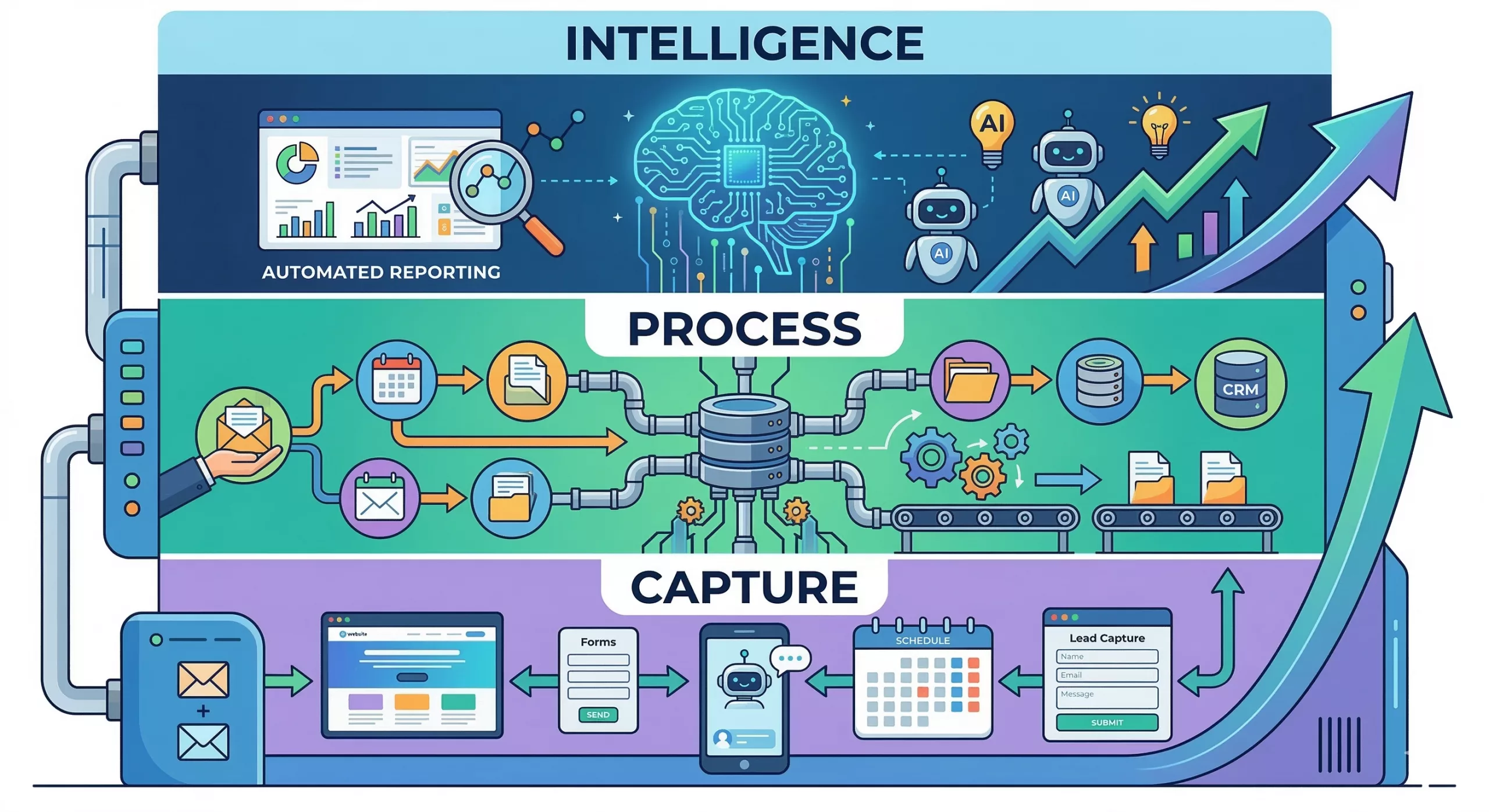
The solution is not to work harder but to design a better system. A modern business operating system breaks down silos and automates routine tasks. It treats the company like a machine, not a pile of to-do lists. In this blueprint, we’ll show how to build a three-layer system, Capture, Process, and Intelligence, that eliminates manual friction and makes growth smoother.
Why Most SMBs Hit a Growth Ceiling
As your company adds customers and projects, complexity explodes. More leads mean more calls, more emails, more scheduling, and more data to manage. In a manual setup, staff simply do everything by hand. They track leads in spreadsheets, juggle separate calendars, and follow up individually. At first, this works, but with every added customer, the workload climbs. Common symptoms emerge:
- Slow lead response: Inquiries sit in a general inbox for hours or days.
- Missed follow-ups: Busy teams drop the ball on nurturing prospects.
- Data silos: Customer info lives in unconnected apps or paperwork.
- Overworked owners: The founder or manager still has to approve every step.
These issues are normal in many SMBs, but they are also self-imposed constraints. When your operation depends on people doing manual chores, you hit a hard ceiling. One CIO describes it like renting out your future: you trade short-term fixes now, but can’t grow later1. In this “Owner-Operator Trap,” each new sale creates new tasks for the owner, so growth feels like stress.
Key insight: Scale requires systems, not just effort. You must shift from reacting to tasks toward architecting how work flows. Instead of asking “How do we do X today?”, ask “How should X happen in a connected system?” That mindset change lets you replace busywork with automation.
Layer One: Capture. Building a Smart Entry Point
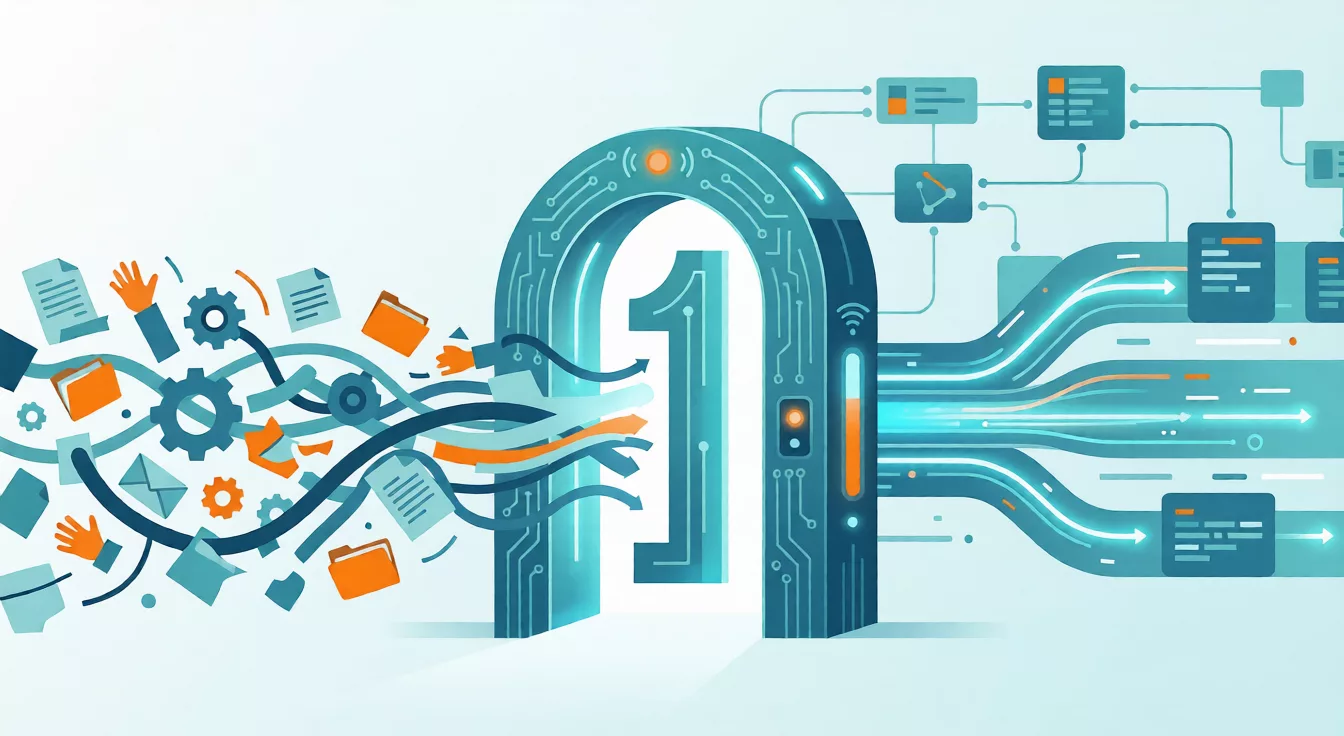
Your website and sales channels should do more than just attract visitors, they must capture every opportunity automatically. In a traditional model, a website is a brochure: a visitor finds a phone number or form, and you hope someone will reply in time. That creates a gap. By contrast, a well-designed Capture layer acts as a 24/7 receptionist and gatekeeper. It uses automated tools to engage prospects the moment they arrive.
Key elements of a Capture layer include:
- Dynamic landing pages and forms: Modern page builders let you create targeted landing pages with built-in lead forms. These forms feed data directly into your system without manual export.
- AI chatbots: A chatbot (e.g. Intercom, Drift, or a custom ChatGPT-based agent) can greet visitors, answer common questions, and even book appointments. Bots never sleep and respond instantly.
- Online booking tools: Integrate tools like Calendly or Acuity so prospects can schedule calls or demos without email tag. Automated booking slots eliminate endless back-and-forth emails.
- Automated responses: As soon as someone submits a form or chat, trigger an auto-reply. Even a simple confirmation email assures leads you’re on it immediately.
These tools ensure zero lead leakage. For example, one study showed that responding to a lead within five minutes makes you four times more likely to close the deal3. In a real-world test, an automated lead response system (sub-30-second replies) booked 5.7× more consultations than a manual team averaging 42-minute response times3. In practice, that means your chances of converting a web inquiry skyrocket if your system answers instantly.
Bullet examples of a strong Capture layer:
- Instant Chatbot Response: A visitor asks about pricing, and the bot either answers or collects their email for follow-up.
- Embedded Booking Link: Prospect clicks “Schedule a Demo,” sees available times, and books a meeting automatically.
- Custom Landing Page: A targeted page for a campaign guides visitors to click a button or fill a quick form, feeding data into your CRM.
- Out-of-hours Follow-up: Even at midnight, an automated reply or chatbot message engages the prospect, making them feel attended to immediately.
With an automated entry point, every inquiry triggers the same professional workflow. You remove the wait and the human delay that kills interest. As one guide notes: “Prospects who want to talk should never struggle to book time. Automated scheduling software allows leads to choose available slots instantly—no back-and-forth emails required. This removes friction and helps sales teams connect faster, which increases conversion rates”4. In short, fix the response gap, and you will win more business without extra ad spend.

Layer Two: Process. Creating the Central Nervous System
Capturing leads is just step one. Those leads must flow into a single system where all data is organized and actionable. This is the Process layer: the central nervous system of your business. Without it, even perfect lead capture is wasted, because the information disappears into chaos.
A robust Process layer is built around a unified platform (often a CRM or business platform) that connects every function. It typically includes:
- CRM/Database: A system (like HubSpot, Zoho CRM, Salesforce, etc.) that holds every contact, deal, and history in one place. It’s your single source of truth for customer data.
- Workflow Automation: Tools (Zapier, Make, or built-in CRM automation) that transfer data and trigger tasks between apps. For example, a new form submission can automatically create a CRM lead, assign an owner, and start an email sequence.
- Scheduling & Calendar: Integrated calendars that sync appointments, reminders, and events without manual entry.
- Email Automation: Sequenced emails and follow-ups that send based on triggers (e.g. “send welcome series after signup”).
- Client Records: Organized storage for proposals, contracts, invoices, and notes tied to each customer.
When these pieces connect, the workload on people drops to zero for routine tasks. For example: a new website lead is captured by the chatbot, Zapier creates a record in HubSpot, an automated email thanks them, and a Calendly invite is sent to schedule a call. All without anyone lifting a finger.
This flow ensures data consistency and clean records. In one case study, a specialty paper seller moved from scattered contacts to an automated CRM system. With Keap CRM, “Papeloja had a central location to store all their contacts and customer records. As a result, employees were able to access information for every single contact, including their contact info and how they interact with the company’s emails and marketing campaigns”5. That structure lets the founder spend his time growing sales instead of hunting data. The outcome was dramatic: they reported an 800% revenue increase within months of CRM adoption6.
Not only does organized data improve day-to-day work, but it also fuels the next layer: Intelligence. When everything is logged in one system, you can confidently analyze it. The alternative, storing leads in spreadsheets or hopping between apps, is a time bomb. As one resource puts it, “The real power of automation comes when everything connects. By integrating lead capture, nurturing, and outreach into your CRM, inbound and outbound data live in one place. This gives your team a complete view of the customer journey, supports seamless handoffs, and ensures consistent engagement at every step”7.
Key benefits of the Process layer:
- No more data re-entry or lost leads. Everything captured is followed up.
- Fast, repeatable service delivery. Your team follows the same workflow automatically.
- Visibility across departments. Marketing knows what sales is doing; support sees every customer’s history.
- Time savings. One CRM user likened adding workflow automation to “adding another member to the team”8.
Layer Three: Intelligence. Turning Data into Insight
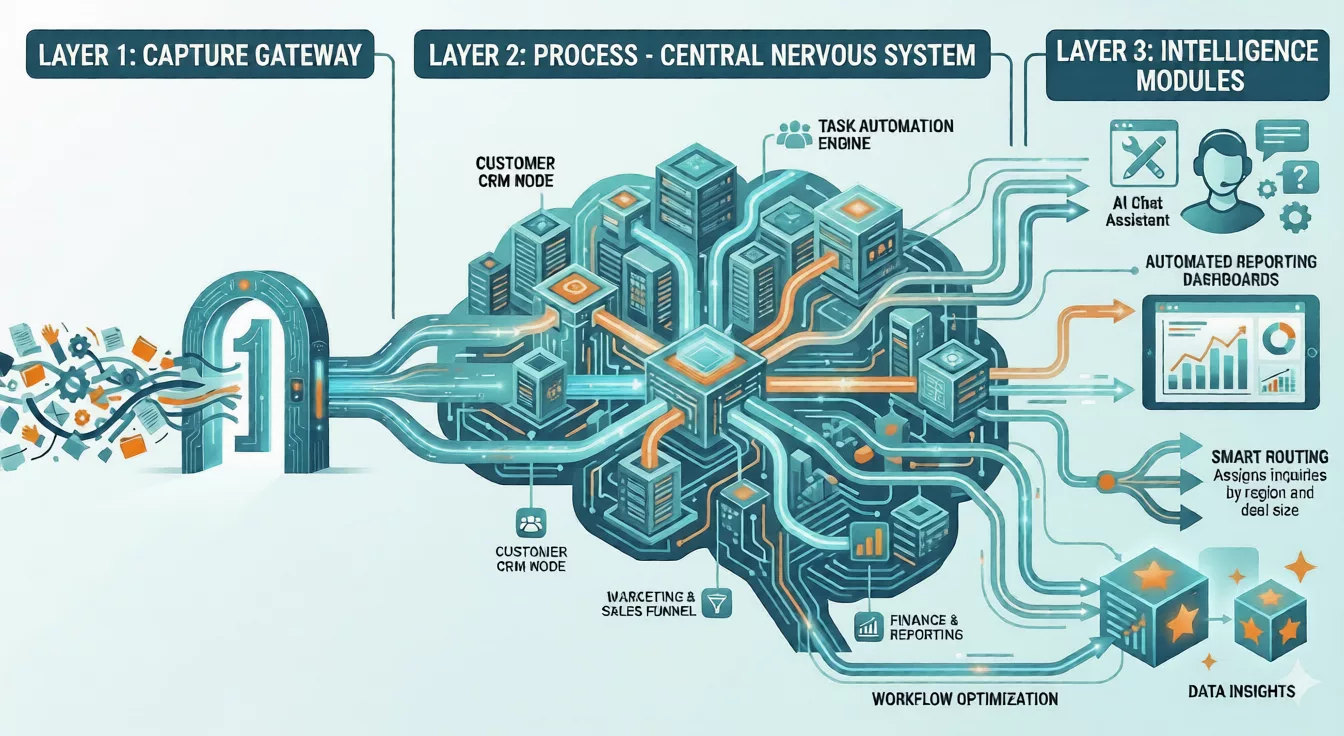
The top two layers (Capture and Process) fix the basic plumbing, but the Intelligence layer is what truly unlocks growth. This layer uses AI and analytics to turn your clean data into an actionable strategy. Think of it as moving from executing tasks to continuously optimizing them.
The Intelligence layer includes:
- AI-assisted responses: Smart agents (chatbots, email bots) that handle common inquiries or draft responses with context. For example, an AI chat agent can field technical questions by pulling from your FAQ database, or draft a first email reply for a sales rep to approve.
- Automated Reporting: Dashboards and reports that update automatically as data comes in. Instead of manual spreadsheets, you get instant KPIs on leads, sales, and support metrics.
- Data Insights and Analytics: Use built-in CRM analytics or BI tools (like Power BI or Google Data Studio) to find trends. Perhaps you discover certain lead sources have 3× higher close rates, or that a certain email subject yields 2× more opens.
- Workflow Optimization: The system should monitor its own efficiency. If a process is lagging (for example, many leads are stuck in one stage), alerts or AI suggestions can trigger process tweaks.
This layer is often overlooked because it sounds fancy, but it’s the foundation for smarter decisions. By analyzing what works and what doesn’t, leadership can act on logic rather than gut feel. For example, AI-based lead scoring can flag your hottest prospects based on behaviour. Case studies show real impact: companies using AI lead scoring have seen conversion rate jumps of 25% to 215%9. In one case, a FinTech startup tripled its pipeline after introducing AI scoring10. Another saw an 80% boost in paid upgrades by using AI-driven sales tools11.
Even without fancy algorithms, simple AI can save time. A guide notes that AI chatbots and automated systems can handle large volumes of routine customer messages. Early adopters reported 27% productivity gains and 23% cost cuts from AI rollouts12. Notably, 91% of SMBs using AI report higher revenue12. In practice, this means your business can scale without just adding staff.
Bullet examples in the Intelligence layer:
- AI Chat Assistant: 24/7 support bot or email assistant that drafts responses using customer history.
- Self-Updating KPIs: A dashboard shows monthly leads and deals, auto-refreshing as data arrives.
- Smart Routing: AI “lead router” that assigns inquiries based on criteria (e.g. by region or deal size) for faster handoff.
- Predictive Forecasting: The system predicts next quarter’s pipeline based on current trends and past patterns.
- Feedback Loop: The software suggests process changes (e.g. refine lead scoring) based on outcomes.
In short, the Intelligence layer makes your system self-aware. It uses the data flowing through your Capture and Process layers as fuel. With clean data in place, automation and AI deliver real business insight. Your strategic moves become evidence-based, not guesswork.
The Power of Connected Systems
The magic happens when all three layers flow together seamlessly. The process looks like this:
- Capture: A lead arrives. Forms and bots capture their info automatically.
- Process: That data flows into the central CRM. Automated workflows kick in (tag the lead, assign to rep, send email).
- Intelligence: The system records every step, feeds analytics, and AI may personalize communications or flag next actions.
When each layer is integrated, the result is a true Automated Business Engine. If any layer breaks, the chain backslides. For example, you might have an amazing capture form that generates leads, but if your CRM processes them manually, you will drop the ball. Similarly, collecting data without analysis means missed opportunities.
Connected systems eliminate bottlenecks. One guide sums it up: “Everything connects—leading to a complete view of the customer journey and seamless handoffs”7.This flow turns a collection of tasks into a living machine. Instead of a person plugging gaps, the software handles routine tasks, so your team can focus on growth.
The Bottom Line: ROI of Automation
Building this three-layer system is a strategic investment, but it delivers measurable returns. Here are typical outcomes you can expect:
- Faster Lead Response: Automated capture and routing mean you reply at once. For example, in a trial case, instant automation booked 5.7× more appointments than a slow manual process3.
- Higher Conversion Rates: Immediate, consistent follow-up keeps prospects engaged. A marketing consultant who switched to automated lead forms saw a 100% lead-to-client conversion and 25% higher monthly revenue13.
- Reduced Cost and Errors: Centralized data cuts duplicate work. One agency saved $300K a year by consolidating tools and automations14. Human error drops when systems do the copy-pasting.
- Staff Time Saved: Teams stop hunting for data or doing manual entry. One small business said automation was “like adding another member” to handle follow-ups8.
- Greater Scalability: With processes codified, you can onboard new customers without proportional headcount growth. For example, a fintech automating lead scoring increased loan volumes 40% with the same staff15.
Over time, these efficiencies compound. SMBs often see a positive ROI on automation within weeks. Industry data shows most achieve payback in 6 weeks, thanks to productivity and cost savings. Ultimately, an automated engine becomes a competitive advantage. A small firm with a smart system can outperform a larger competitor still relying on spreadsheets and sticky notes.
Key Takeaways and Best Practices
- Use the Right Tools: For capture, use form builders (Unbounce, Leadpages) and AI chatbots (Drift, Intercom). For process, implement a robust CRM (HubSpot, Zoho, etc.) and link tools with Zapier or similar. For intelligence, explore native AI in your CRM or analytics platforms (Salesforce Einstein, HubSpot AI, Power BI).
- Map Your Workflow: Document how a customer inquiry should flow through your business. Identify every manual handoff, then automate or eliminate it.
- Train Your Team: Ensure staff know how to use the new system. Provide playbooks so that, for example, every new lead triggers an email template.
- Measure Continuously: Set KPIs (response time, lead conversion, cost per lead) and use your Intelligence layer dashboards to track them. Adjust processes where needed.
- Start Small, Scale Fast: Begin by automating the highest-impact tasks (lead capture, scheduling, follow-up). Once the basics work, expand into analytics and advanced AI features.
Building a modern business operating system takes effort up front, but it pays off in freedom. You trade the endless firefighting of manual processes for a self-running engine. With that foundation, growth no longer means chaos. You can respond faster, spend time on strategy (not busywork), and scale without fear.
Ask yourself: Is your business still relying on human effort, or is it operating on an intelligent system that you designed? If you’re unsure, schedule a complimentary 20-minute strategy call with us. We are here to help you succeed. The companies that thrive will be the ones whose systems, rather than their people, drive daily operations.
Citations
1 2 Operational Debt Compounds Quietly Until You Can't Scale
https://www.ciomastermind.com/blog/operational-debt-compounds-quietly-until-you-cant-scale
3 Harvard study: Speed to Lead boosts conversions by 400% | Kevin Nash posted on the topic | LinkedIn
https://www.linkedin.com/posts/kevin-nash-b55a7a225_theres-a-harvard-study-that-says-waiting-activity-7384924903898103808 BJKm
4 7 7 Ways Lead Capture Automation Software Boosts Sales + 8 Tools
<https://capacity.com/blog/lead-capture-automation-software/
5 6 8 13 14 CRM Case Studies: 5 Small Business Getting Great Results
https://softailed.com/blog/crm-case-studies
9 10 11 15 Case Studies: Companies That Improved Conversions with AI Lead Scoring
https://www.smartlead.ai/blog/case-studies-companies-that-improved-conversions-with-ai-lead-scoring
12 SMB AI ROI: Getting Started with Business AI in 2026 — Swfte AI
https://www.swfte.com/blog/smb-ai-roi-guide
- Why Most SMBs Hit a Growth Ceiling
- Layer One: Capture. Building a Smart Entry Point
- Layer Two: Process. Creating the Central Nervous System
- Layer Three: Intelligence. Turning Data into Insight
- The Power of Connected Systems
- The Bottom Line: ROI of Automation
- Key Takeaways and Best Practices
- Citations